
Data Capture Review and Input Validation
Data Capture Review
This guide covers the Data Capture Review feature, which enables a strict validation of inputs during data capture steps before progressing the assembly. A data capture step allows the operator to scan or manually enter data during an assembly (e.g. serial number, part number).
By default, a data capture step will automatically advance once a successful input event occurs. Enabling the Data Capture Review feature introduces a pause, presenting the operator with a confirmation modal. This ensures high-accuracy data tracking, especially when scanning complex serial numbers, batch codes, or variable part numbers.
Enabling Data Capture Review
The Data Capture Review feature can be found in the Live tab on the Setup page.
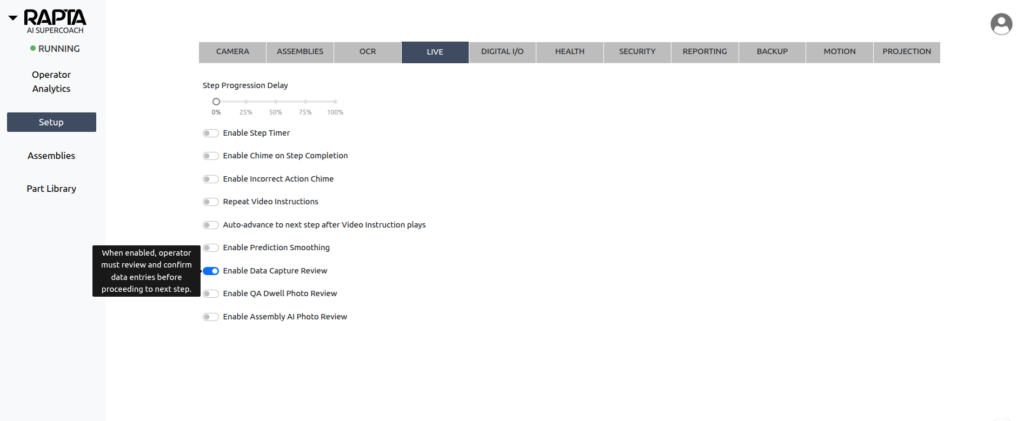
To enable Data Capture Review:
- Navigate to the Setup page.
- Select the LIVE configuration tab.
- Toggle the Enable Data Capture Review switch to the ON position.
The Operator Experience
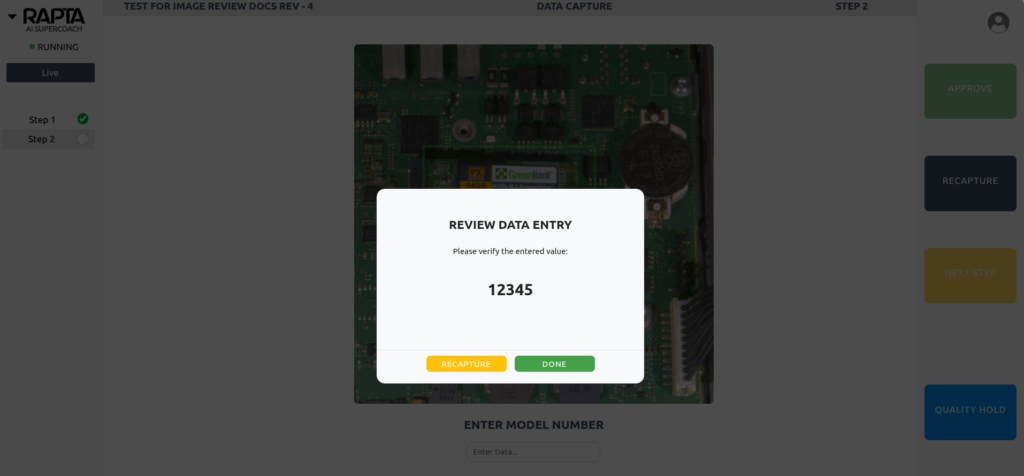
Once enabled, the operator is presented with a confirmation modal after entering values on a data capture step. This modal allows the option of recapturing the data if it is incorrect.
Input Validation and Regex
To further prevent incorrect data from entering your assembly records, you can configure Input Validation on a per-step basis during the assembly training phase.
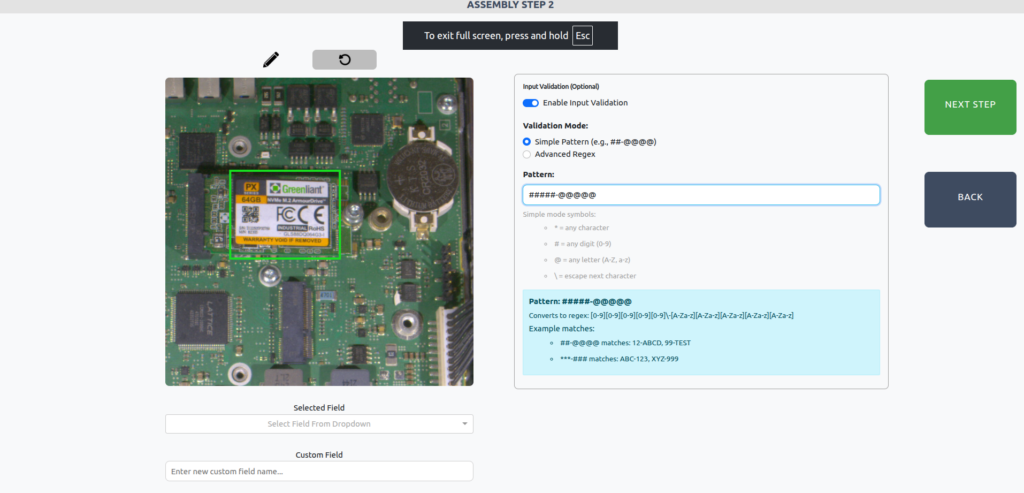
When Input Validation is enabled, the Data Capture Review modal switches into Validation Mode. If the captured data does not match your required format, the modal will display an error and prevent advancement until the pattern is matched. The input can be edited either by clicking RECAPTURE or directly in the text box on the modal.
During the step creation/training process, Input Validation offers two modes: Simple Pattern and Advanced Regex.
Simple Pattern Mode
Simple Pattern mode is designed for standard, consistent string formats using easy-to-understand wildcard symbols.
Symbol Guide:* = Any character# = Any digit (0-9)@ = Any letter (A-Z, a-z)\ = Escape next character (treat the next symbol as a literal character)
Example Simple Regex Pattern: ##\-@@@@
Matches: 12-ABCD, 99-TEST
Fails: 1-ABC, 12-1234
Advanced Regex Mode
Advanced Regex mode uses standard regular expressions to enforce complex logic, length requirements, or specific terminology. The captured string must be an exact match to the entire regex pattern.
Example Advanced Regex Pattern: ^[A-Z]{2}-\d{4}-[A-Z0-9]{2}$
Description: Two uppercase letters, a dash, four digits, a dash, and two alphanumeric characters.
Matches: AB-1234-X9
Fails: ab-1234-X9, AB-123-X9, AB-1234-X99
Example Advanced Regex Pattern: ^(PASS|FAIL)$
Description: The system will only accept the exact words PASS or FAIL.
Matches: PASS, FAIL
Fails: pass, Passed, P
Example Advanced Regex Pattern:^\d{6,10}$
Description: A numeric-only string that must be between 6 and 10 digits long.
Matches: 123456, 1234567890
Fails: 12345, 12345678901, 123ABC