
Archives: Knowledge Base

Color Check Action

The Color Check step type enables Rapta Supercoach to verify that colored objects are present and appear in the correct order during production. This feature is useful for inspecting wires, labels, indicators, clips, connectors, or other color-coded components where the order and separation of colors matter. Color Check uses the platform camera to capture a …
Color Check Action Read More »

Photograph Capture Review

Photographic Documentation: QA Dwell and Assembly AI Photo Review Photographic documentation is a critical component of modern manufacturing quality control. Ensuring that the system captures clear, representative images at every key juncture of your assembly not only provides a reliable audit trail but also empowers downstream traceability and continuous improvement. To best facilitate the capture …

Photograph Capture Review Read More »

Assembly AI Action

Overview AssemblyAI is a position-independent part placement verification system. It uses AI-powered object detection to verify that parts are placed in the correct positions during assembly — regardless of where the assembly sits on the workbench or how it is oriented. AssemblyAI works by using anchor parts as spatial reference points. During training, a supervisor …

Assembly AI Action Read More »

Camera Color Calibration

Rapta’s AI platform relies on accurate color representation from the camera to deliver reliable inspection and verification results. Over time, or after changes to the operating environment, the camera’s color balance may drift from its optimal settings. This can result in degraded AI performance particularly for applications that depend on color differentiation such as wire …

Camera Color Calibration Read More »

Default User Name and Password

The Rapta station comes with a default user name and password for accessing the supervisor menu. If you find yourself inadvertently locked out and you have not yet set your own user profile, you can enter supervisor mode with the following credentials First Name: default Last Name: user Password: [No password, do not enter anything …

Default User Name and Password Read More »

Fine-Tuning AI Performance

When training your assembly steps in Rapta’s AI platform, you have access to powerful controls that let you optimize how the AI recognizes and validates each step. Two key settings—Min Prediction Threshold and Prediction Smoothing—give you the flexibility to balance speed and accuracy for your specific manufacturing environment. Min Prediction Threshold: Setting Your Confidence Bar …

Fine-Tuning AI Performance Read More »

Scan Region Action

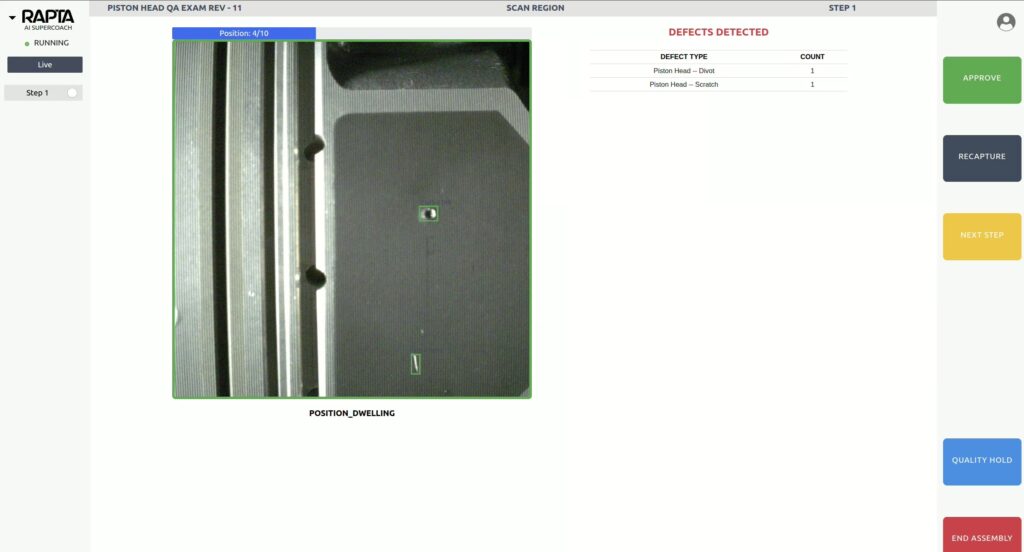
Overview The Scan Region Action enables automated inspection of parts and assemblies through programmed camera scanning patterns. This powerful action type works with Rapta SuperPod and PrecisionPod positioning systems to execute complex multi-axis scanning sequences, capturing images at precise intervals to detect defects, foreign objects/debris (FOD), or parts across large or detailed surfaces. Version Support: …

Scan Region Action Read More »