
How can we help?
Work in Process — Reworking Incomplete Assemblies
The Work in Process tab gives operators a single place to find assemblies that were started but not finished. From here, you can resume an assembly from exactly the right step. This is useful when an assembly was ended early, placed on a quality hold, or set aside for a disposition (DISP) review.
Using the Work in Process Tab
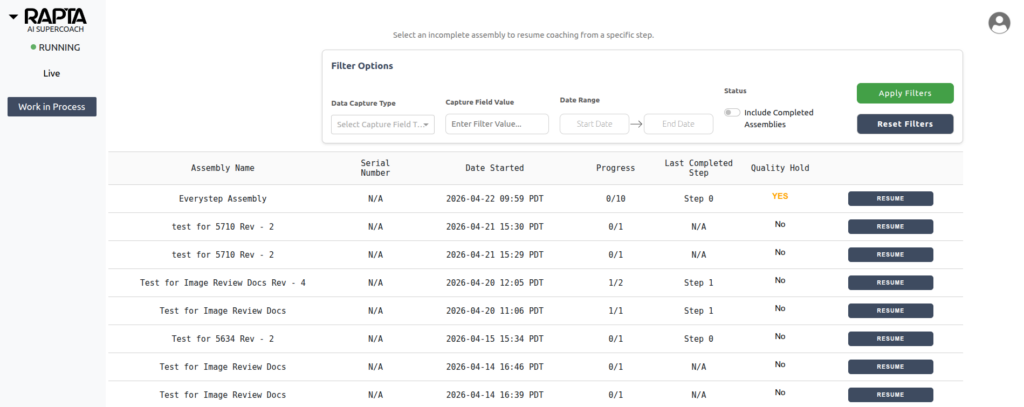
- While in Operator mode, click on the Work in Process tab on the left sidebar.
- Find the assembly that needs to be resumed or reworked. If the assembly is not immediately visible, the filtering tools at the top of the page can be used to narrow the search.
- Click the RESUME button on the assembly record row.
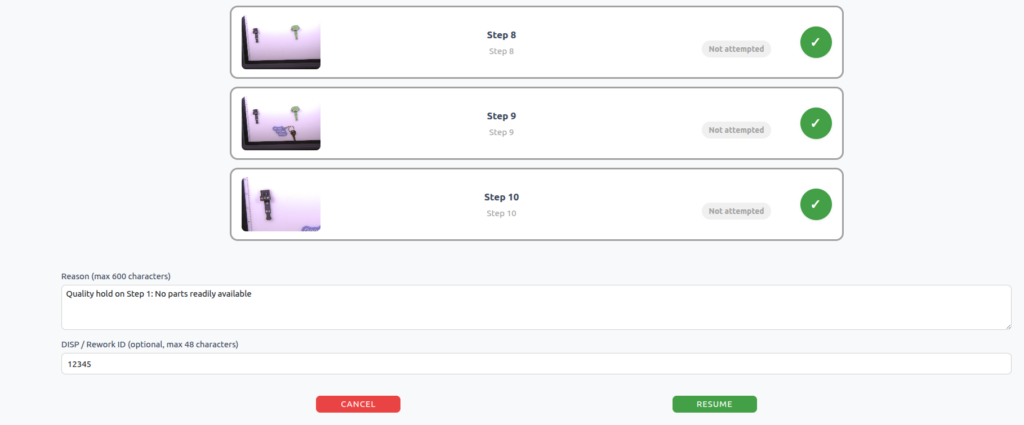
- Use checkmarks to select all steps that need to be reworked or have yet to be completed.
- Assembly will resume at the earliest selected step and proceed through the remaining selected steps in order.
- Any step that was never attempted is selected automatically.
- Enter a Reason for the rework. This field is required.
- (Optional) Enter a DISP / Rework ID if your process requires a tracking number.
- Click RESUME to start the rework from the earliest selected step.
- Click CANCEL to close the modal without making changes.
Clean Recordkeeping
When you resume an assembly, Rapta creates a new rework record linked to the original. The original assembly record is preserved in full, documenting the initial incomplete process, while the steps selected for rework are repeated in order on the new record.