
Assembly Actions
Assembly actions give our customers the flexibility to build complex manufacturing sequences without writing a single line of code. Each step in an assembly is configured with an action that defines what the system does at that point in the build — verifying a part with AI, capturing text with OCR, recording a torque value, playing an instructional video, and more.
Our platform supports a number of actions, including:
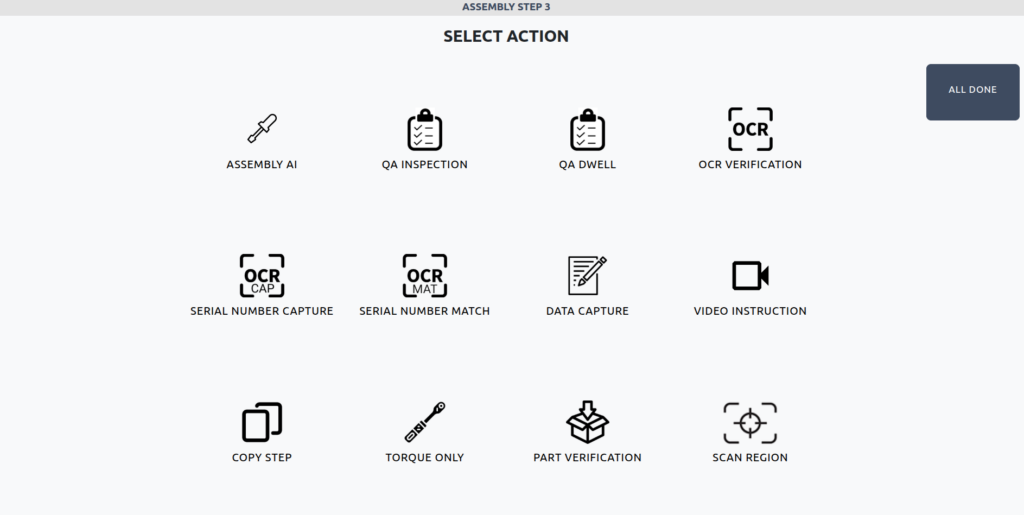
Assembly AI
This action uses AI object detection to verify that parts are placed in the correct location on an assembly. Supervisors define an anchor (a fixed reference feature) and one or more parts with tolerance areas relative to that anchor. During the build, the system detects the anchor and confirms each part is detected in position before the step advances — guiding operators to correct any misplaced parts in real time. Supports variants for interchangeable parts from different suppliers.
QA Inspection
This action uses computer vision AI to perform automated QA checks of assemblies with pass or fail judgment. Supervisors provide correct and incorrect examples to train the model on precise differences in assembly configurations.
QA Dwell
This action is identical to a QA Inspection action, but the system will not proceed until pass conditions are met.
OCR Verification
This action uses optical character recognition AI to verify text on wires, labels, components, and any other application.
Serial Number Capture
This action uses optical character recognition AI to capture text values from the assembly and populate these in the assembly record. Example targets for this step type are serial numbers, part numbers, batch codes, etc.
Serial Number Match
This action works in conjunction with Serial Number Capture and uses optical character recognition AI to verify that a previously captured code matches in a later instance. For example, this step can be used to ensure that serial numbers on multiple labels match the overall product.
Data Capture
This action enables operators to scan or manually enter any data value. Connect virtually any standard USB capture device such as barcode scanners, RFID readers, Zebra Technologies, Honeywell Industrial Automation and Datalogic. Capture 1D/2D barcodes and QR codes instantly and seamlessly integrate data into your digital assembly reports.
Video Instruction
This action plays a pre-recorded video that guides the operator through a manufacturing step. Videos can be viewed for as long as needed before the operator advances, and can be combined with automated QA checks, OCR verification, serial number verification, and barcode capture in subsequent steps.
Copy Step
This action duplicates an existing step from either the current assembly or any other assembly previously created in the system. The step is copied with its configuration, trained models, and reference images. Ideal for assemblies with repeated operations or similar QA checks across multiple steps.
Note: Serial Number Capture, Serial Number Match, and Data Capture steps cannot be copied.
Torque Only
This action records a torque value from a connected Smart Torque Wrench, perfect for fastening steps where the torque value is the quality gate.
Part Verification
This action uses object detection AI to detect and verify individual parts against trained examples from your Parts Library, confirming the correct part and quantity of parts is present at the correct location before advancing.
Note: Examples of parts must be added to the Part Library and the object detection model must be trained before using the Part Verification step.
Scan Region
This action uses object detection AI to identify defects and foreign object debris (FOD) within a defined search region. Scan region pairs perfectly with Rapta’s SuperPod and PrecisionPod systems which allow the precise programming of camera movement over a region of interest. Static cameras are also supported — in that case, the action either scans the entire camera frame, or uses a subset of zoom parameters. Note: Examples of parts, their defects, and FOD must be added to the Part Library and the object detection model must be trained before using the Scan Region step.
Example Assembly
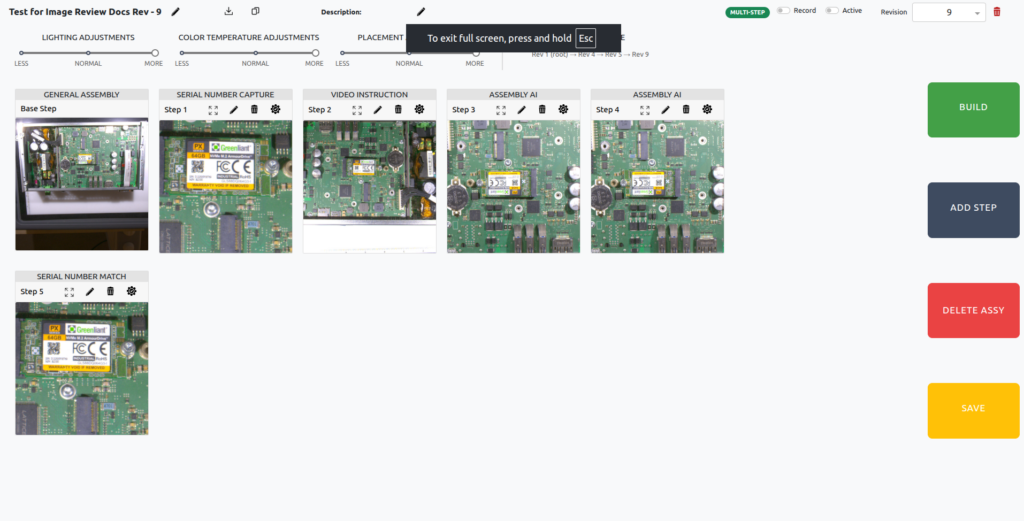
- Base Step – Base steps represent a starting state for any assembly.
- Serial Number Capture – Record the serial number of the item to tie it to the assembly record
- Video Instruction – Provide the operator with recorded instructions for the next assembly steps. Video instructions can be viewed for as long as needed before operator proceeds.
- Two Assembly AI steps – Operator performs two actions to install parts and their position is verified.
- Serial Number Match – The serial number is matched at completion of the assembly to verify the correctness of the item and close out the assembly.